Every module, and the rule it follows.
The console brings your dealership’s apps together in one place: customers, messaging, calendar, inventory, accounting ledger, approvals and history. Each app opens full screen, and virtual employees work there alongside your team. Our strength is that everything is combined: each customer has a single file, with their full history.
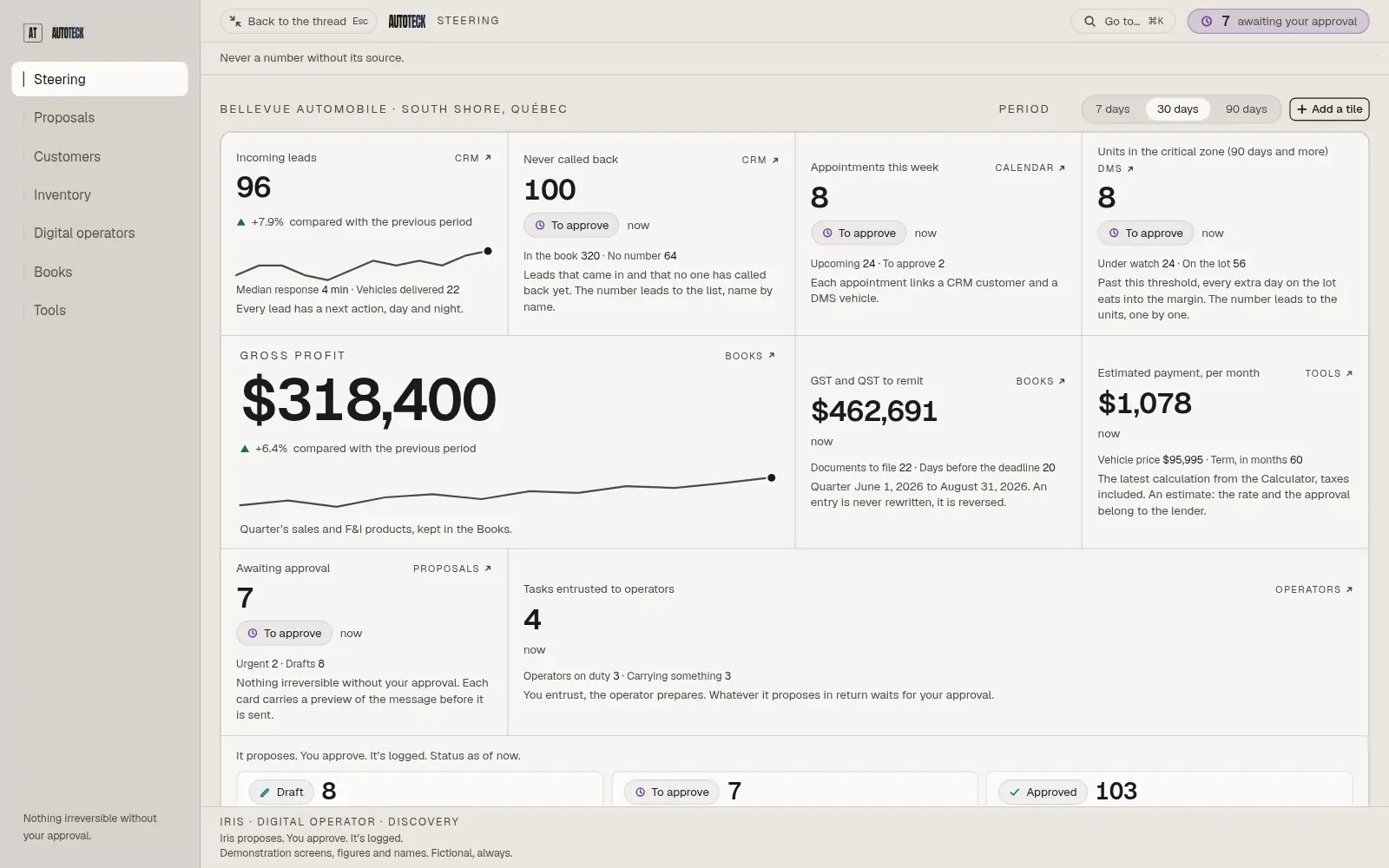
What is in the console?
Dashboard · Proposals · Calendar
Never a number without its source.
Each tile opens the screen that produces it. Whatever awaits your decision lands in Proposals, with the full message.
Open this moduleDigital operators
Every reference is cited, or the operator abstains.
Each one holds a role: leads, follow-ups, listings. Its profile shows what it refused, and why.
Open this moduleCRM · Inventory · Accounting ledger
Every file has a next action, with a date.
A file that goes quiet comes back up on its own. In the ledger, an error is reversed: your accountant sees the error and its correction.
Open this modulePayment calculator
An estimate says so, and it breaks down.
Taxes apply automatically, from the amount financed to the total interest. The final rate depends on the lender.
Open this moduleKeep your software. Or stop paying for it.
Most of the platforms and software you already use can connect to AutoTeck. Yours isn’t listed? We build the connection for you.
Email and calendar


- Outlook
Messaging
- Slack
- Microsoft Teams

Leads and listings


- AutoTrader
- CarGurus
- Kijiji
Accounting and management


- Excel
Signatures and documents

- Docusign
Trademarks of their respective owners. These are connections, not partnerships.
- What AutoTeck reads from it
- Contacts, files and the history of every exchange. Your CRM stays in charge of its own data.
- What it can replace
- The console CRM holds files and their follow-ups, on the day you decide.
- What AutoTeck reads from it
- Whatever it opens: units, their costs, their listings. We look at it with you during the demo.
- What it can replace
- The console inventory holds units, their price and their syndication.
- What AutoTeck reads from it
- QuickBooks or Sage: the chart of accounts and the entries already posted.
- What it can replace
- The accounting ledger holds GST, QST and financial statements, in one place.
- What AutoTeck reads from it
- Google Calendar or Outlook: appointments already booked, so nothing is double-booked.
- What it can replace
- The console calendar ties every appointment to a customer and a vehicle.
Ready to wear. Then tailored to fit you.
The modules arrive ready.
At onboarding, every setting takes the shape of your dealership.
| Setting | Ready to wear | Tailored for you |
|---|---|---|
| New lead follow-up | Day 1, day 3, day 7 | Within the hour, day 2, day 5 |
| Taxes on invoices | To fill in | GST and QST, your numbers |
| Hours and holidays | Monday to Friday | Your hours, Québec holidays |
| Operator autonomy | Propose only | Follow up alone, never a price |
Settings: the only module that never turns off.
What you turn on tells us how you work, and everything is set up without development.
Your console
Steering · Front line · Office · Tools · Settings
A role that doesn’t exist yet, a module of your own: we build it with you, and it arrives as a draft until you approve it.
Your logo and colors too: the console takes them on at onboarding.
Frequently asked questions
- There is no list price: each console is configured for one dealership. The price comes out of your tailored plan; the representative presents it at the meeting, with a quote built for what you need, and answers your questions about what it includes.
- No, you keep your software. The platform works alongside it, or you switch to its own, at the pace you choose: nothing forces you to change everything on day one. The question “Do I have to re-enter my data?”, in the Integration section of the Questions page, says what comes in first.
- You do. It stays exportable, through the export as through the API. Your purchase prices stay with you. A digital operator only sees what its role opens to it, and its permissions are closed by default. The Security and compliance page shows each of these mechanisms, screen by screen.
- Not necessarily. The console’s accounting ledger keeps receipts, GST and QST, reconciliation and closing. If your accountant prefers to keep their software, they keep it: if it’s QuickBooks, the console reads it, without writing to it. The representative looks with you at what suits your dealership best.
- The apps in your console are activated according to the package you choose, and each one can also be bought on its own. The modules you start with are chosen with the representative, and the console is built from that choice: you find in it the apps you kept, not the others.
- You decide on your settings there, one by one: your follow-ups, your hours, your taxes, what each virtual employee does on its own, your logo and your colours. The console log keeps the author and the time of every setting. Onboarding comes between the meeting and go-live.
- From a reading. Every tile leads to the screen that produces it, and a figure that no reading produces is not displayed. Without a reference margin, no return is displayed. An estimate stays labelled as one: under the calculator’s payment, the console says so.
- No. You text a digital operator the way you would text a colleague: a VIN and photos for a listing, a photo of an invoice for an expense. You can also write to it in the console, or take the action yourself, since every module works by hand. In all three cases, the action lands in the same file.